Update from release 9 to release 10
This technical note lists how to update from release 9 to release 10.
The user guide has been adapted to new release 10. Special boxes provide the reference for legacy release 9.
Legacy release 9
Special boxes provide the reference for Legacy release 9.
New features
16-bit fonts
Up to release 9, PDLS featured 8-bit fonts, limited to 255 characters, based on ISO-8859-1 or Latin 1.
With release 10, PDLS brings 16-bit fonts, with a set of up to 65536 characters, based on ISO-10646 or Unicode.
The corresponding parameter for FONT_MODE is USE_FONT16_HEADER.
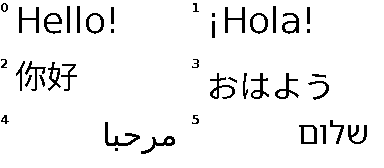
The new multilingual fonts
A new multilingual font, Noto, is added to DejaVu.
The Noto family of fonts includes fixed Monospace, and proportional Serif and Sans Serif variants, and supports non-Latin sets of characters.
Basic edition
The Basic edition keeps the 8-bit extended Terminal font.
Text coded in UTF-8
Up to release 9, PDLS only accepted text coded on ISO-8859-1 or Latin 1. Text coded in UTF-8 had to be converted first into ISO-8859-1 or Latin 1.
With release 10, PDLS now supports text coded in UTF-8 directly. This is valid for gText(), and the Graphics and GUI elements.
Text coded in UTF-16
gText() also accepts text with characters coded in UTF-16.
The new utf8to16() function converts a text with characters coded in UTF-8 into a text with characters coded in UTF-16.
The new utf16to8() function converts a text with characters coded in UTF-16 into a text with characters coded in UTF-8.
Unified board definition
Up to release 9, PDLS required setting a parameter at build-time to access the EXT4 extension board.
With release 10, PDLS provides a unified structure for the definition of the main controller boards. The name of the main controller board includes a suffix EXT3 or EXT4 to select the extension board.
With the suffix EXT3, the Arduino Nano Matter definition sets NOT_CONNECTED for the unused pins.
///
/// @brief Arduino Nano Matter with Silicon Labs MGM240P, tested
/// @note Numbers refer to pins
/// @note Recommended board
///
const Board_EXT boardArduinoNanoMatter_EXT3 =
{
    .scope = BOARD_EXT3, ///< EXT3, EXT3.1

    .panelBusy = 10, ///< EXT3 and EXT3.1 pin 3 Red -> D10
    .panelDC = 9, ///< EXT3 and EXT3.1 pin 4 Orange -> D9
    .panelReset = 8, ///< EXT3 and EXT3.1 pin 5 Yellow -> D8
    .flashCS = 7, ///< EXT3 and EXT3.1 pin 8 Violet -> D7
    .panelCS = 6, ///< EXT3 and EXT3.1 pin 9 Grey -> D6
    .panelCSS = NOT_CONNECTED, ///< EXT3 and EXT3.1 pin 12 Grey2
    .flashCSS = NOT_CONNECTED, ///< EXT3 pin 20 or EXT3.1 pin 11 Black2
    .touchInt = NOT_CONNECTED, ///< EXT3-Touch pin 3 Red
    .touchReset = NOT_CONNECTED, ///< EXT3-Touch pin 4 Orange
    .panelPower = NOT_CONNECTED, ///< EXT4 pin 20 White power circuit -> D2
    .cardCS = NOT_CONNECTED, ///< External SD-card board
    .cardDetect = NOT_CONNECTED, ///< External SD-card board

    // EXT4 specific
    .button = NOT_CONNECTED, // EXT4 pin 12 Grey
    .ledData = NOT_CONNECTED, // EXT4 pin 13 Violet WS2813C
    .nfcFD = NOT_CONNECTED, // EXT4 pin 17 Orange NT3H2111 !Field detect
    .imuInt1 = NOT_CONNECTED, // EXT4 pin 18 Red LIS2DH12 !INT2
    .imuInt2 = NOT_CONNECTED, // EXT4 pin 19 Brown LIS2DH12 !INT1
    .weatherInt = NOT_CONNECTED // EXT4 pin 20 Black HDC2080 !INT
    // End of EXT4 specific
};
With the suffix EXT4, the Arduino Nano Matter definition includes additional pins for the RGB LED, button, panel power and sensors interrupts.
///
/// @brief Arduino Nano Matter with Silicon Labs MGM240P, tested
/// @details Variant with panelPower, button and LED for EXT4
/// @note Numbers refer to pins
/// @note Recommended board for EXT4
///
const Board_EXT boardArduinoNanoMatter_EXT4 =
{
    .scope = BOARD_EXT4, ///< EXT4

    .panelBusy = 10, ///< EXT3 and EXT3.1 pin 3 Red -> D10
    .panelDC = 9, ///< EXT3 and EXT3.1 pin 4 Orange -> D9
    .panelReset = 8, ///< EXT3 and EXT3.1 pin 5 Yellow -> D8
    .flashCS = 7, ///< EXT3 and EXT3.1 pin 8 Violet -> D7
    .panelCS = 6, ///< EXT3 and EXT3.1 pin 9 Grey -> D6

    .panelCSS = NOT_CONNECTED, ///< EXT4 not available
    .flashCSS = 5, ///< EXT3 pin 20 or EXT3.1 pin 11 Black2 -> D5
    .touchInt = NOT_CONNECTED, ///< EXT3-Touch pin 3 Red
    .touchReset = NOT_CONNECTED, ///< EXT3-Touch pin 4 Orange
    .panelPower = 2, ///< EXT4 pin 20 White -> D2
    .cardCS = NOT_CONNECTED, ///< External SD-card board
    .cardDetect = NOT_CONNECTED, ///< External SD-card board

    // EXT4 specific
    .button = 3, // EXT4 pin 12 Grey
    .ledData = 4, // EXT4 pin 13 Violet WS2813C
    .nfcFD = 17, // EXT4 pin 17 Orange NFC NT3H2111_2211 !Field detect
    .imuInt1 = 16, // EXT4 pin 18 Red LIS2DH12 !INT1, I2C address = 0x19
    .imuInt2 = 15, // EXT4 pin 19 Brown LIS2DH12 !INT2, I2C address = 0x19
    .weatherInt = 14, // EXT4 pin 20 Black HDC2080 !INT, I2C address = 0x40
    // End of EXT4 specific
};
Viewer edition
The Viewer edition now supports all the screens, including the four colours black-white-red-yellow.
The Viewer edition also includes utilities to select the multilingual characters and generate 16-bit fonts libraries.
Deprecated features
Conversion of UTF-8
Because PDLS now supports text coded in UTF-8 directly, the utf2iso() is no longer required and is deprecated.
Fonts in external SPI Flash
The new 16-bit fonts are stored as header files only and added to the application statically at build-time.
The option with fonts stored in external SPI Flash and used dynamically at run-time is no longer available.
The parameters USE_FONT_HEADER and USE_FONT_FLASH for FONT_MODE are deprecated.
Serial console
hV_HAL_Serial_print() and hV_HAL_Serial_println() are deprecated. Use hV_HAL_Serial_printf() and hV_HAL_Serial_crlf() instead.
Modified features
Font family
The multilingual Noto font, under the SIL Open Font License , is added to the DejaVu font.
The names of the fonts now start with Font16 instead of Font, and specify the languages.
Basic edition
The Basic edition keeps the 8-bit extended Terminal font.
Display of text
gText(), the Graphics and GUI elements, now accept text with characters coded in UTF-8.
gText() directly accepts text with characters coded in UTF-8.
char text8[] = "éàîüç $£€¥ ¿?";
myScreen.gText(10, 10, text8);
gText() also accepts text with characters coded in UTF-16.
// Null-terminated 16-bit text
uint16_t text16[] = {0xe9, 0xe0, 0xee, 0xfc, 0xe7, 0x20, 0x24, 0xa3, 0x20ac, 0xa5, 0x20, 0xbf, 0x3f, 0x00};
myScreen.gText(10, 40, text16);
gText() only accepted text with characters coded in ISO-8859-1 or Latin 1.
Text coded in UTF-8 needed first to be converted into ISO-8859-1 or Latin 1 with utf2iso().
char text8[16] = [0];
strcpy(text8, utf2iso("éàîüç $£€¥ ¿?"));

myScreen.gText(10, 10, text8);
Selection of board
The unified board definition simplifies the selection of the board on the main code. Board_EXT is the recommended synonym of pins_t.
// Boards
Board_EXT myBoard = boardArduinoNanoMatter_EXT4;

#include "Pervasive_Wide_Small.h"
Pervasive_Wide_Small myDriver(eScreen_EPD_290_KS_0F, myBoard);
#define BOARD_EXT4 4 ///< EXT4 board

#define USE_EXT_BOARD BOARD_EXT4 ///< Selected board
The build-time parameter USE_EXT_BOARD is set to BOARD_EXT4 on the hV_List_Options header file.
// Boards
pins_t myBoard = boardArduinoNanoMatter;

#include "Pervasive_Wide_Small.h"
Pervasive_Wide_Small myDriver(eScreen_EPD_290_KS_0F, myBoard);
The main code selects the board.
Selection of fonts
The names of the fonts now start with Font16 instead of Font, and specify the languages.
// Fonts
#include "hV_Font16_Latin_DejaVu.h"
#include "hV_Font16_Chinese_Noto.h"
The main code includes the fonts libraries.
uint8_t fontLatin;
fontLatin = myScreen.addFont(Font16_Latin_DejaVuSans20);
fontLatin -= (fontLatin > 0) ? 1 : 0;

uint8_t fontChinese;
fontChinese = myScreen.addFont(Font16_Chinese_Latin_NotoSans12);
fontChinese -= (fontChinese > 0) ? 1 : 0;
The main code selects the fonts.
The names of the fonts start now with Font16; specify the languages, Latin or Chinese_Latin; and keep unchanged the family DejaVu or Noto, the variant Sans, and the size 20.
// Fonts
fontSmall = myScreen.addFont(Font_DejaVuSans12);
fontSmall -= ((fontSmall > 0) ? 1 : 0);
fontMedium = myScreen.addFont(Font_DejaVuSans16);
fontMedium -= ((fontMedium > 0) ? 1 : 0);
fontLarge = myScreen.addFont(Font_DejaVuSans24);
fontLarge -= ((fontLarge > 0) ? 1 : 0);
fontVery = myScreen.addFont(Font_DejaVuMono48);
fontVery -= ((fontVery > 0) ? 1 : 0);
The main code selects the fonts.
The names of the fonts start with Font and mention the family DejaVu, the variant Sans or Mono, and the size 20.
Editions and variants names
Evaluation and Commercial editions
PDLS_Advanced is the single variant for the Evaluation and Commercial editions.
Viewer edition
PDLS_Viewer and Driver_EPD are the new names for the PDLS_Viewer_Touch and Driver_EPD_Viewer libraries.
PDLS_Viewer is the single variant for the Viewer edition.
Basic edition
PDLS_Basic is the single variant for the Basic edition.