Fonts
The Basic edition includes the Terminal font with
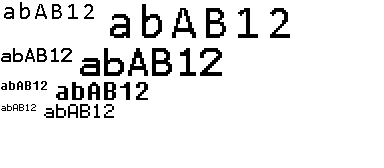
Terminal font simple and double sizes
-
sizes 8, 12, 16 and 24;
-
large sizes 16, 12, 32 and 48;
-
ISO 8859-1 or Latin 1 extended set of characters
0x00..0xff;
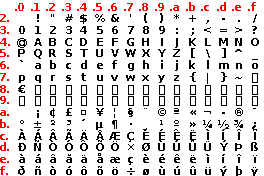
Terminal font set of characters
Configuration
The fonts are provided as header files and added to the application statically at build-time.
No configuration is required, as FONT_MODE is set to USE_FONT_TERMINAL.
Use
String text = "abAB12";

myScreen.selectFont(Font_Terminal16x24);
myScreen.gText(0, 0, text);
myScreen.gTextLarge(100, 0, text);
selectFont()- selects the font based on its index, from range
0..fontMax() - 1; or its name,Font_Terminal6x8,Font_Terminal8x12,Font_Terminal12x16andFont_Terminal16x24. gText()- prints a text at the graphic coordinates.
gTextLarge()- prints a text at the graphic coordinates with twice the size.
On the example above, the 16x24 character becomes a 32x48 character.
All other functions described at the example for Text are available.
Example
This is the core of the code from example EXT4_LargeFont.ino.
Main code
void displayMultiplier()
{
    myScreen.setOrientation(ORIENTATION_LANDSCAPE);
    uint16_t x = 0;
    uint16_t y = 0;

    String text = "abAB12";
    uint8_t length = text.length();

    myScreen.selectFont(Font_Terminal16x24);
    myScreen.gText(x, y, text);
    x += myScreen.characterSizeX() * length;
    myScreen.gTextLarge(x, y, text);
    y += myScreen.characterSizeY() * 2;
    x = 0;

    myScreen.selectFont(Font_Terminal12x16);
    myScreen.gText(x, y, text);
    x += myScreen.characterSizeX() * length;
    myScreen.gTextLarge(x, y, text);
    y += myScreen.characterSizeY() * 2;
    x = 0;

    myScreen.selectFont(Font_Terminal8x12);
    myScreen.gText(x, y, text);
    x += myScreen.characterSizeX() * length;
    myScreen.gTextLarge(x, y, text);
    y += myScreen.characterSizeY() * 2;
    x = 0;

    myScreen.selectFont(Font_Terminal6x8);
    myScreen.gText(x, y, text);
    x += myScreen.characterSizeX() * length;
    myScreen.gTextLarge(x, y, text);
    y += myScreen.characterSizeY() * 2;
    x = 0;

    myScreen.flush();
    hV_HAL_delayMilliseconds(8000);
}